Captions blank or missing after reopening or moving a project
Bring back captions that show Media Offline, show "Open Brevidy to restore captions.", or don't appear after you reopen, move or share a project.
Your captions are almost never lost. Most missing-caption problems happen when the .brevidy folder gets left behind or Premiere needs a restart.
Where your captions are saved#
Brevidy saves your captions in a folder named .brevidy next to your Premiere project file (the .prproj), in .brevidy/native/. Each caption set has a pair of files with the same name:
- a
.pngfile: the caption clip you see on the timeline. - a
.bcapfile: your words, timing and style.
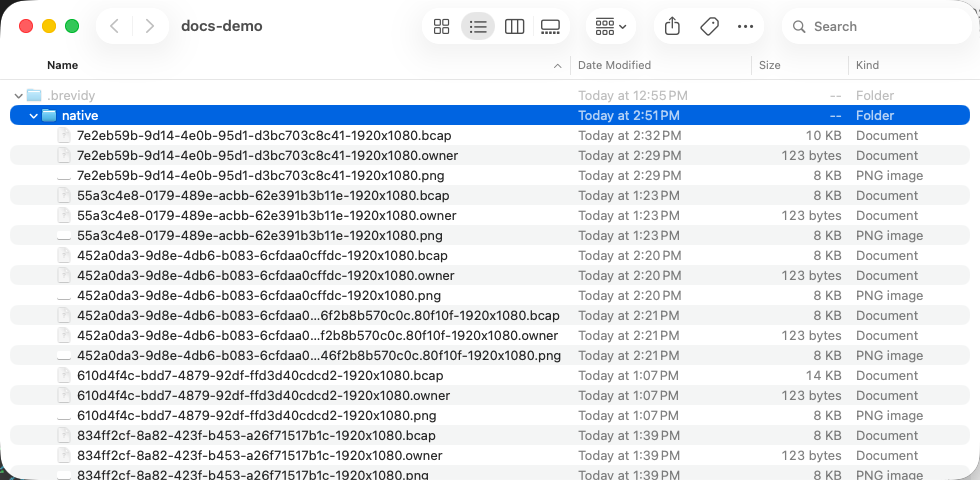
When you move, copy or share a project, take the whole .brevidy folder with it. Until you save a project for the first time, captions are kept in ~/Library/Application Support/Brevidy/native/ (Mac) or %LOCALAPPDATA%\Brevidy\native\ (Windows).
Caption clips show Media Offline#
The project was moved or copied without its .brevidy folder.
- Close the project in Premiere.
- Copy the whole
.brevidyfolder from the project's old location so it sits next to the.prproj. - Reopen the project.
- Still offline? In the Project panel's
Brevidy Captionsbin, select the offline items, right-click and chooseLink Media…. - Point Premiere to the matching
.pngfiles in.brevidy/native/.
Can't find the old folder? Contact support before you delete or re-create anything.
The video shows "Open Brevidy to restore captions."#
The Brevidy Captions effect can't find the .bcap file that holds your words.
- Open the sequence, then open Brevidy from
Window>Extensions>Brevidy. - Wait a few seconds, then scrub so Premiere redraws the frame.
- Still there? Check that every
.pngin.brevidy/native/has a.bcapwith the same name, and copy any missing ones from the old location.
Captions are on the timeline but don't show in the video#
- Check that the eye icon (
Toggle Track Output) is on for the caption clips' track. - Open the set switcher. If the set has a crossed-out eye, select it and choose
Show in Premiere. - If you updated Brevidy recently, quit Premiere completely and reopen it.
- If Brevidy shows an effect notice, see "Failed to add Brevidy Captions effect".
Captions made with Brevidy 1.9#
Captions made with Brevidy 1.9 are marked Legacy in the set switcher. If they render wrong or not at all, sometimes with Caption template cache repaired:
- Quit Premiere completely, and Media Encoder if it's open.
- Reopen Premiere and your project.
- Open the Brevidy panel and wait a few seconds.
See Upgrading from 1.9.
Good to know#
- Don't click
Syncto bring back missing captions. It doesn't restore caption files, and on another computer it may transcribe the audio again and use minutes. - Anyone who plays or renders the project needs Brevidy installed and the
.brevidyfolder next to the project. They don't need the panel open.