Transcription and languages
Choose the language, handle videos with more than one language, keep or drop filler words, and teach Brevidy names and jargon.
Transcription settings are in the Create window: the language, filler words, and names Brevidy should expect.
Open the transcription settings#
- In the Brevidy panel, under
Create New, clickCaptions. - Click
Advanced. - Click the
Transcriptionrow.
The same settings appear when you add more captions to a set.
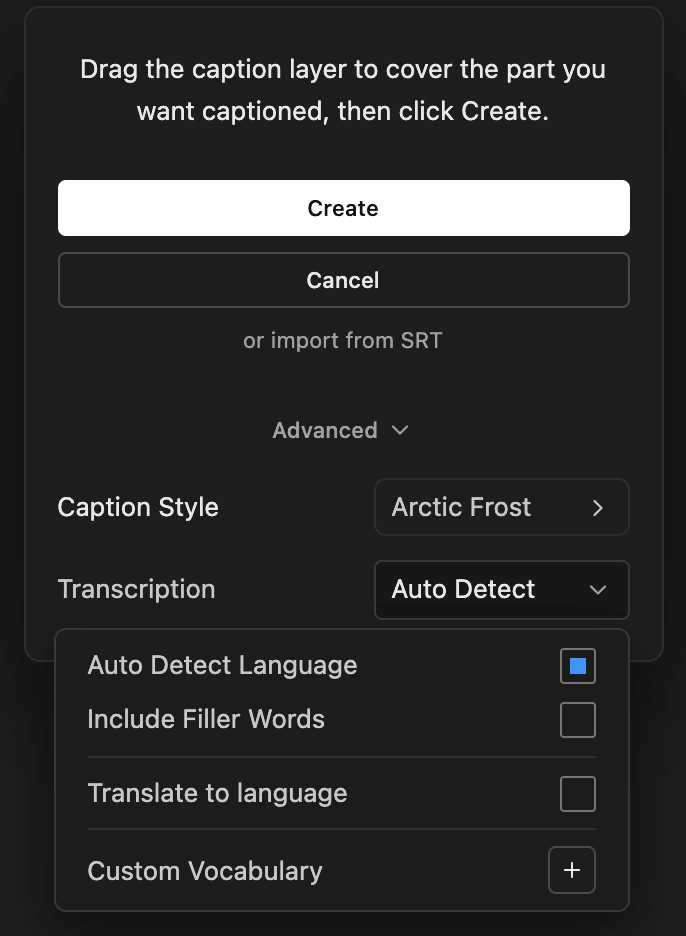
Pick the language#
- One language, not sure which: leave
Auto Detect Languageon. - One language you know: turn
Auto Detect Languageoff and pick it fromLanguage. This is the most reliable choice for short clips and strong accents. - Speakers switch languages: turn
Auto Detect Languageoff, then turnMultiple Languageson. You can leave theMulti Languagelist empty.
To get a translated caption set as well, see Translate while you create captions.
Keep or remove filler words#
With Include Filler Words off (the default), Brevidy removes hesitations ("um", "uh"), stutters and restarts. Turn it on to keep every word as spoken. Changing it uses no extra minutes.
Add custom vocabulary#
Custom vocabulary helps Brevidy spell names, brands and jargon.
- Click the
+button next toCustom Vocabulary. - Type the term in
Word or phrase. - Click
Add.
Brevidy uses up to 100 terms, each up to 5 words.
Clear saved transcripts#
Brevidy reuses the transcript it saved for each media file, so footage it has heard before costs no minutes. To start fresh:
- Click your account picture at the top right of the Brevidy panel.
- Choose
Clear Transcript Cache. - Confirm.
This deletes every saved transcript on this computer. Caption sets and edits stay. See How minutes are counted.
Supported languages#
The Language list has 99 languages:
Afrikaans, Albanian, Amharic, Arabic, Armenian, Assamese, Azerbaijani, Bashkir, Basque, Belarusian, Bengali, Bosnian, Breton, Bulgarian, Catalan, Chinese, Croatian, Czech, Danish, Dutch, English, Estonian, Faroese, Finnish, French, Galician, Georgian, German, Greek, Gujarati, Haitian Creole, Hausa, Hawaiian, Hebrew, Hindi, Hungarian, Icelandic, Indonesian, Italian, Japanese, Javanese, Kannada, Kazakh, Khmer, Korean, Lao, Latin, Latvian, Lingala, Lithuanian, Luxembourgish, Macedonian, Malagasy, Malay, Malayalam, Maltese, Maori, Marathi, Mongolian, Myanmar (Burmese), Nepali, Norwegian, Nynorsk, Occitan, Pashto, Persian, Polish, Portuguese, Punjabi, Romanian, Russian, Sanskrit, Serbian, Sindhi, Sinhala, Slovak, Slovenian, Somali, Spanish, Sundanese, Swahili, Swedish, Tagalog, Tajik, Tamil, Tatar, Telugu, Thai, Tibetan, Turkish, Turkmen, Ukrainian, Urdu, Uzbek, Vietnamese, Welsh, Yiddish, Yoruba.
Translation supports fewer languages. See Translate captions.
Good to know#
- There's no model picker. The
Modelsetting (Best,Accurate,Fast) was removed in 2.0.12. - Your choices are remembered for every project on this computer, including the language, so check
Languagewhen you start a new project. - Picking a different language transcribes again and uses minutes, even for footage Brevidy already transcribed.
- Strange symbols or the wrong language? Delete the caption set, turn
Auto Detect Languageoff, pick the language, and create the captions again.