Podcasts, multi-mic and speakers
How Brevidy captions each line once when several mics hear it, and how to name and merge speakers.
When two or more mics record the same conversation, Brevidy captions each line once and works out who said it.
How Brevidy handles several mics#
Brevidy transcribes every audible audio track under the caption layer. Muted tracks are skipped, and if you solo a track, only soloed tracks count. Where mics overlap:
- Each line is kept once, usually from the speaker's own mic.
- Bleed can be left out. If a quiet word on one mic is someone else talking louder on their own mic, Brevidy drops it.
- Channels count separately. A dual-mono file with a different mic on each side counts as two mics.
Keep each mic on its own track. Brevidy captions the angle a multicam clip plays.
If a word shows twice or goes missing#
- Twice: delete the extra word in the transcript. If a room mic keeps doubling words, mute its track and click
Sync. - Missing: check that the track isn't muted, another track isn't soloed, and the clip is enabled. See Why wasn't this audio captioned?
Speakers#
Brevidy labels each word Speaker 1, Speaker 2 and so on, and keeps the same label for the same voice across clips. Labels don't show in the transcript, but they drive Split at speaker changes (see Line breaks) and styles by speaker.
Name or merge speakers#
- Click the
⋯button (Style actions) next toStyle. - Choose
Speakers…. - Type a name for each speaker.
- If two rows are the same person, choose
Same asand the other speaker on one of them. - Click
Save.
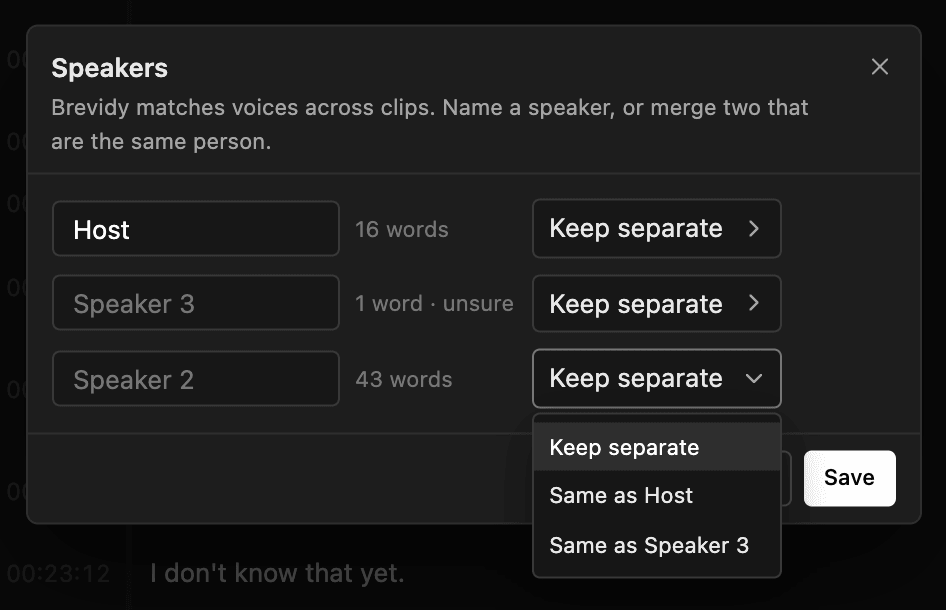
Names and merges are saved with the caption set and stay after Sync. To give each speaker their own style, see Assign styles by speaker.
Good to know#
- One person can show up as two speakers. Merge them with
Same as. - If music or ambience adds stray words, see Music and background audio.