Install Brevidy
Install the Brevidy panel and the Brevidy Captions effect in Premiere Pro, sign in, and keep Brevidy up to date.
One installer for Mac or Windows puts in the Brevidy panel and the Brevidy Captions effect, which draws your captions and titles.
Before you start#
- Premiere Pro 2024 or later. Older versions show
Unsupported Version. - The Adobe Creative Cloud desktop app.
- A Brevidy account from brevidy.pro/signup, and an internet connection.
Install Brevidy#
- Go to brevidy.pro/download and sign in.
- Click
Download for macOSorDownload for Windows. - Run the installer.
- Open Premiere. If it was open, quit it completely and open it again.
- Choose
Window>Extensions>Brevidy.
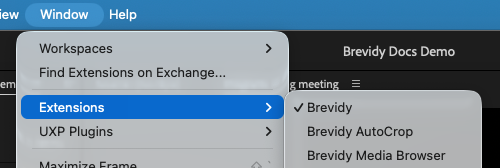
If Brevidy asks to install the captions effect#
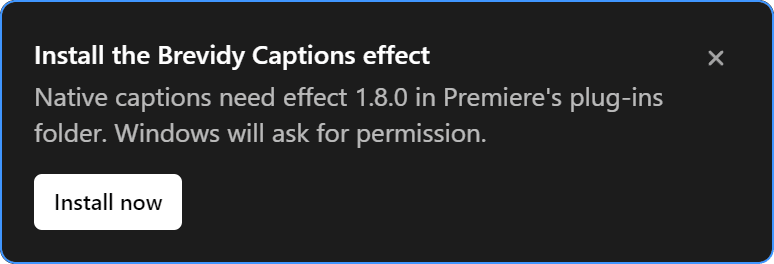
Usually the installer handles this. If the panel shows Install the Brevidy Captions effect (or Update the Brevidy Captions effect):
- On Windows, click
Install now, thenYes. On a Mac, Brevidy installs it for you. - Wait for
Restart Premiere Pro to finish. - Save your project, quit Premiere and open it again.
- Clicked
Noon Windows? ClickTry againon theBrevidy Captions effect not installednotice. - Can't approve it on a work computer? Ask whoever manages it to run the Brevidy installer.
- Still failing? See "Failed to add Brevidy Captions effect".
Sign in#
- Open the Brevidy panel.
- Enter your brevidy.pro email and password.
- Click
Sign in.
Bought through aescripts? Click sign in with aescripts and enter your license code.
Update Brevidy#
When Brevidy <version> is available. appears:
- Click
Update now. On Windows, clickYesif asked. - Wait for
Update successful!. - Restart Premiere. One restart covers the panel and the effect.
To check for updates, click the version number at the bottom of the panel (for example V: 2.0.12). A dot means one is waiting.
Update failed? Click Download Update, quit Premiere and run the installer.
Good to know#
- Brevidy not in
Window>Extensions? Quit Premiere fully and open it again. - Windows says "Windows protected your PC"? Click
More info, thenRun anyway. Other installer trouble: see Installer problems. - The installer gives you the version your account should get: the beta if you're in the beta program, or the one your team admin chose.