Why wasn't this audio captioned?
Find out why Brevidy left some audio out, including music and background tracks, and how to bring it back.
Brevidy captions the audio Premiere would play under the caption clips. When audio is muted, turned down or offline, Brevidy leaves it out and tells you why, in an error that starts The caption layer isn't over any audio Brevidy can transcribe. or a Some audio wasn't captioned notice.
After each fix, click Sync at the bottom of the Brevidy panel. Audio Brevidy already transcribed comes back without using minutes.
Fix each reason#
A track is one row of the timeline (A1, A2 and so on for audio).
| What you see | Fix |
|---|---|
Audio on muted track A2 … or The audio under it is on muted track A2. | Turn off Mute Track (M) on the track header |
… isn't captioned because another track is soloed. | Turn off Solo Track (S) on the soloed track |
Disabled audio clips (at …) aren't captioned. | Right-click the clip and choose Enable |
Audio clips with their volume all the way down … | Raise the clip level or track fader |
Some audio clips are offline … | Right-click the clip, choose Link Media… and find the file |
Audio at … runs past the caption clips … | Drag the edge of a caption clip over the audio |
Captions at … were over footage no caption clip covers now, so Sync removed them. | Extend a caption clip back over that footage |
12 words not captioned with A3's words weren't captioned: … | Click Caption A3 on the notice. See Music and background audio |
The caption layer isn't over any audio clips. | Drag the caption layer over clips with dialogue |
Generated audio (bars and tone), reversed clips and files under half a second long are left out on purpose.
No speech under the layer#
What you see: No speech was found in the audio under the caption layer.
The caption layer is over music, silence or B-roll. Drag it over dialogue and try again. If there's clearly speech under it, see the next section.
A section with speech came out empty#
Some older 2.0 betas could save a section as silent by mistake, and Brevidy keeps reusing that saved transcript.
- Click your account picture at the top right of the Brevidy panel.
- Choose
Clear Transcript Cacheand confirm. - Open the account menu again and choose
Deleteto delete the caption set. - Create the captions again. See Create captions.
Music and background audio#
Brevidy captions words on every audible track, song lyrics included. It leaves a track's words out only when the track plays continuously (like a music bed), is at least 15 dB quieter than someone speaking, and you turned it down in your mix. A person's mic never counts as background.
After Create or Sync, a notice such as "38 words not captioned" names the track.
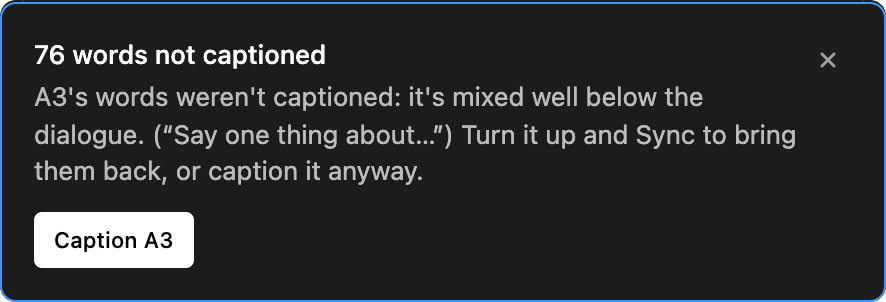
- Caption it anyway: click the button on the notice, for example
Caption A3. It uses no minutes. - Leave a song or noise out: mute its track or disable its clips, then click
Sync.
The "Words from music or background audio?" notice means a long clip added very few words, usually music or room noise. Mute that track or disable the clips, then click Sync, or click Don't show again.
Brevidy doesn't read ducking done with Essential Sound auto-ducking, audio effects or submix faders. Lower music with clip volume or the track fader instead.
Good to know#
- Brevidy follows Premiere: muted tracks are skipped, solo is respected, and multicam clips use the audio angle Premiere plays.
- In and Out points only decide where a new caption layer starts. What gets captioned is the audio under the caption clips.
- With several mics on one conversation, Brevidy keeps each line from the mic where it's loudest. See Podcasts, multi-mic and speakers.
- Still stuck? Contact support with
Copy diagnosticsfrom the notice and a screenshot of the whole timeline.