How Brevidy uses AI in Premiere ProThis all-in-one Adobe Premiere Pro plugin uses AI to streamline every step, so you can focus on storytelling, not tedious tasks.#Brevidy Captions#AI#Video Editing AI#Premiere Pro AI
Frequently asked questions about BrevidyHave questions about Brevidy? From features and setup to our credit system, here are the top 3 answers you need to get started quickly and confidently.#Brevidy Captions#Premiere Pro Captions#Automatic Captions
Brevidy's pricing explainedPlans for every creator, from TikTok shorts to full YouTube series. Brevidy helps you edit faster, stay in flow, and deliver emotionally engaging content.#Brevidy Captions#Premiere Pro Captions#Animated Captions
Brevidy’s AI Premiere Pro caption plugin: Made for creators and video editorsBrevidy is an AI-powered plugin that lives right inside Adobe Premiere Pro. It streamlines and enhances the editing process, especially for social video workflows. One of its standout features? Captions powered by artificial intelligence that are accurate, fast, and context-aware.#Brevidy Captions#Premiere Pro Captions#Video editing#Animated Captions
What’s new in Brevidy: Smarter captions in Premiere Pro, 3D animations, and more!We’ve been hard at work at Brevidy, and we’re excited to roll out a fresh batch of updates designed to make your video editing faster, smoother, and more creative than ever.#Brevidy Captions#Premiere Pro Animation#Premiere Pro Caption
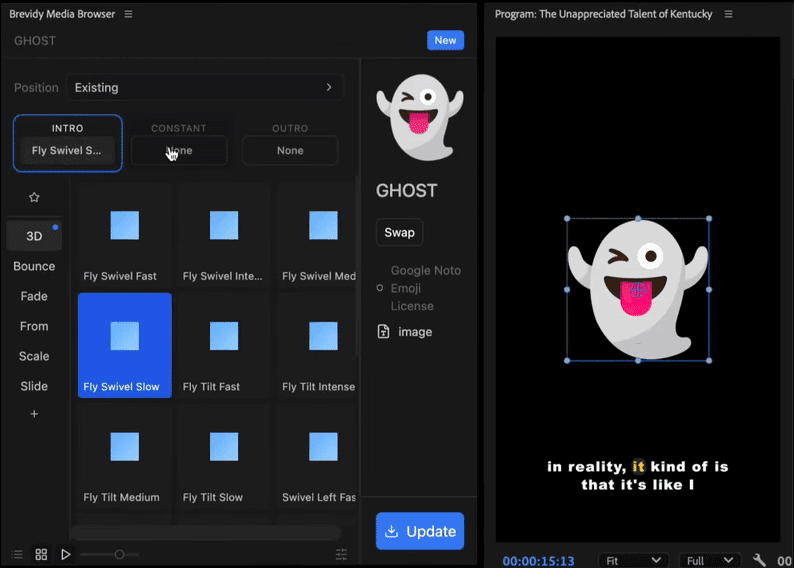
How to import emojis and GIFs into Premiere Pro (The Easy Way)Watch this video to learn how to import, animate, and customize emojis and GIFs directly inside Premiere Pro using Brevidy. You'll see just how easy it is to turn simple edits into scroll-stopping content—without ever leaving your timeline.#Brevidy Captions#Emojis#Premiere Pro Emojis#Premiere Pro Stock Videos
5-step process to creating captions in Premiere Pro using BrevidySince creating captions in Premiere Pro is difficult, we decided to create Brevidy: a powerful Premiere Pro extension that lets you generate bold, animated captions with just a few clicks. #Brevidy Captions#Premiere Pro Captions#Video editing#Animated Captions
Importing stock media in Premiere Pro with BrevidyForget about saving files to your desktop, importing folders, or dragging clips around. Brevidy removes all those steps. It’s fast, seamless, and perfect for tight turnarounds.#Brevidy#Video editing#Stock Media#Premiere Pro Stock Media
How to create captions for Instagram reels and storiesIf you’re looking for more precise and dynamic captions, Brevidy’s AI-powered tools are your best friend.#Social#Social Media#Instagram reels#Video content#Instagram captions